Apple Wallet for businesses in Spain
What can a customer store in Wallet, how a loyalty card looks and why you don't need your own app to get started.
When you think of Apple Wallet, you probably think of bank cards or boarding passes. But there's something else you can store there: the loyalty card for your café, your barbershop or your salon. And the best part: your customer doesn't need to download any app.
This guide explains what Apple Wallet is for businesses, how it works in practice and how you can start using it today, even if you know nothing about technology.
Benchmarks: Apple Wallet, digital loyalty ROI research, and local-business loyalty studies.
What is Apple Wallet and why does it matter for your business?
It's not just for bank cards
Apple Wallet (formerly Passbook) is the iPhone's native app for storing digital cards. Most people use it for credit or debit cards, but its functionality goes much further.
Wallet can store any type of digital "pass": a boarding pass, a concert ticket, a train ticket, a discount coupon — and, most relevantly, a loyalty card. This functionality is available to any business, not just large companies.
What a customer can store in their Wallet
Your business's loyalty card lives in the same space as the customer's bank card and travel card. That means it's always to hand — not buried in a specific app they have to search for.
That matters commercially, not just visually. Loyalty research consistently shows higher repeat visits, higher spend per visit and measurable ROI when the customer journey is simple and the reward progress is visible.
And not just Apple: Google Wallet works the same way on Android. If you issue loyalty cards for Wallet, you can support both iPhone and Android customers with the same flow.
How a loyalty card works in Apple Wallet
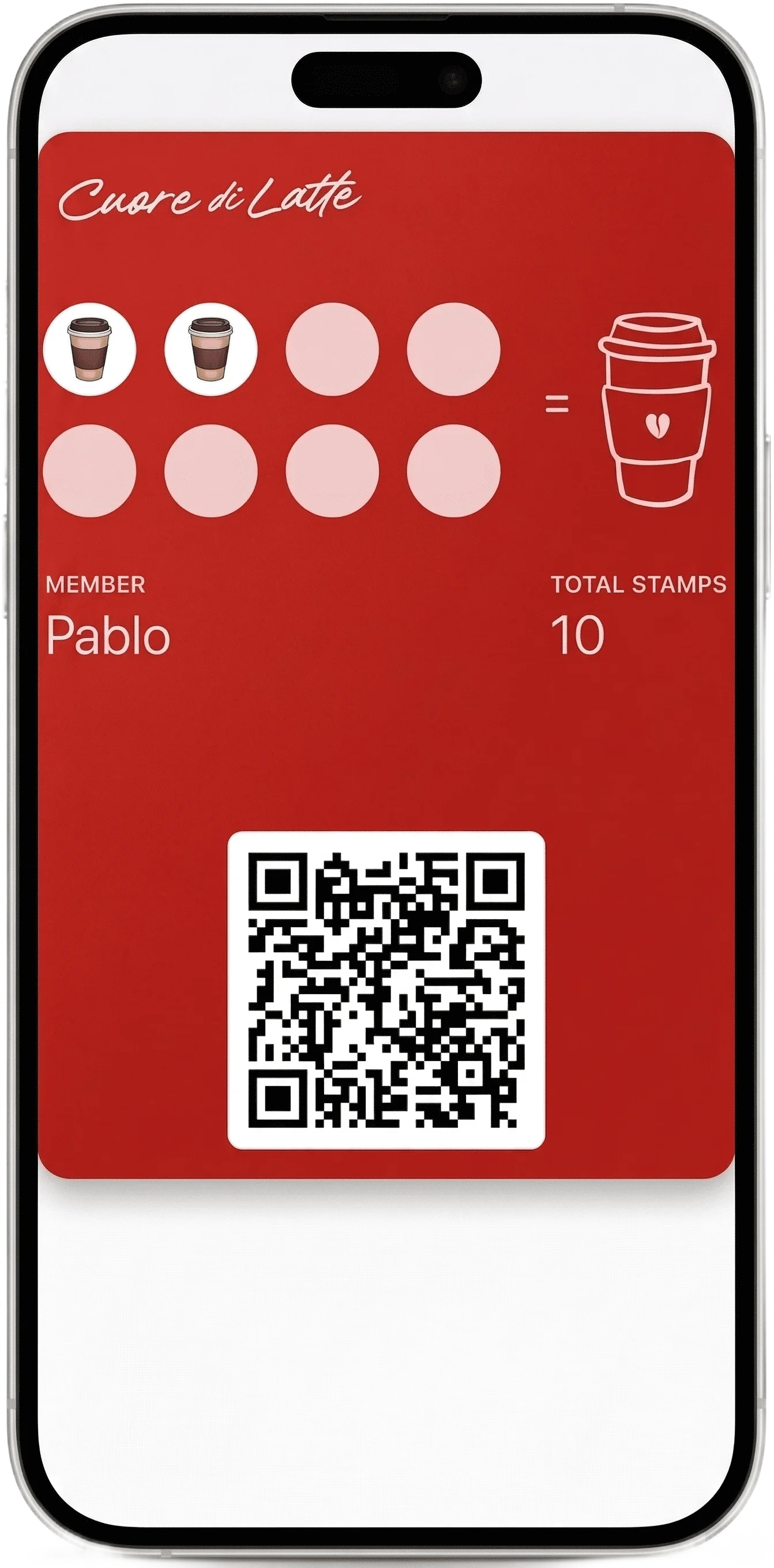
This is what it looks like on the customer's iPhone
The card appears in Apple Wallet alongside the customer's other everyday cards. It updates in real time whenever you add a stamp or log a visit.
Step 1 — The business creates the card (no code needed)
With a platform like Loyalita, creating a digital Wallet card requires no technical knowledge. You choose the program type (stamps, cashback, tiered discounts or membership), customize the design with your business's colors and logo, and in minutes you have a QR code ready to print and put on your counter.
Step 2 — The customer scans the QR and saves it in seconds
The customer points their phone camera at the QR. On iPhone, a prompt appears to "Add to Wallet" — one tap and the card is saved. On Android the process is identical but in Google Wallet. The customer doesn't create an account, doesn't receive a welcome email and doesn't install an app. The whole action takes a moment.
This is key: friction is minimal. The less the customer has to do to adopt the system, the higher the percentage who will actually use it.
Step 3 — The system updates the card automatically
Every time the customer visits or makes a purchase, you add the stamp or log the transaction from your dashboard. The card updates on the customer's phone in real time — without them having to do anything.
When they reach the reward, they receive an automatic notification: "You've completed your card! Your next coffee is free." When they walk near your venue, the phone shows them the card via geolocation.
Real advantages over other solutions
No app to download — the barrier that most holds back loyalty
The biggest problem with traditional loyalty programs is the app friction. Asking a customer to download a specific app for your business is asking too much — conversion rates drop dramatically. The customer doesn't have enough motivation to install an app for a café they've just visited for the first time.
With Wallet that barrier disappears. The customer already has the app installed — they just need to scan a QR. It's the difference between "would you mind downloading this?" and "point your phone at this".
Notifications arrive without the customer opening any app
Wallet cards have two types of notification that work without any customer action:
- Geolocation: when the customer walks near your venue, the phone automatically shows the card on the lock screen.
- Manual: from your dashboard you can send a push notification to all customers with an active card — to announce a special menu, a seasonal offer or just a reminder.
Neither of these notifications requires the customer to have any additional app installed. They arrive directly because the card lives in Wallet.
Works on iPhone and Android (Google Wallet)
Apple Wallet and Google Wallet are separate but complementary ecosystems. Loyalty cards created with Loyalita work on both. For the customer it's transparent — they scan the same QR and the phone automatically detects whether to open Apple Wallet or Google Wallet based on the operating system.
| Feature | Own app | Wallet card |
|---|---|---|
| Customer installs something | ✗ Specific app | ✓ Nothing (already has Wallet) |
| Push notifications | ✓ Yes | ✓ Yes, + geolocation |
| Customer setup friction | ✗ Several steps before first use | ✓ Scan the QR and tap “Add to Wallet” |
| Development cost | ✗ Thousands of euros | ✓ From €25/month |
| Content updates | Requires publishing new version | ✓ Real time |
| iOS + Android compatible | Separate apps needed | ✓ One QR for both |
Which type of business benefits most?
Apple Wallet for loyalty works best when the customer can and wants to come back regularly. The most common cases:
- Coffee shops and bars: high visit frequency, stamp or cashback program, geolocation notification highly effective
- Hair salons and barbershops: 4–6 week cycle, automatic reminder that triggers return visits
- Beauty studios: tiered discount programs, monthly memberships
- Neighbourhood shops: any retail with a local and repeat customer base
- Fitness studios: memberships, class bundles, attendance programs
Works less well for businesses where purchases are very infrequent (once a year or less), such as jewellers, removals or appliance retailers.
Want to see what your card would look like in Apple Wallet?
With Loyalita it's ready in 10 minutes. No developers, no app for the customer. From €25/month.
Create my loyalty card →How to get started — no technical knowledge needed
The full process has three steps and requires no programming knowledge or external contractors:
Create your Loyalita account
Sign up, choose your business type and program type. The platform guides you step by step. 5 minutes.
Customize your card
Add your business name, upload your logo and choose your colors. The card is generated automatically, ready for Wallet. 3 minutes.
Print the QR and display it in your venue
Download the high-resolution QR and put it on the counter, on the table or at the door. From that moment, any customer can save your card in seconds.
"Frictionless loyalty works because the customer does almost nothing: scan once, save the card, see the progress, come back again."
Frequently asked questions
No. Apple Wallet is available to businesses of any size, including small and medium ones. With platforms like Loyalita, you don't need to be a developer or have a direct contract with Apple — the platform handles all the technical side for you.
Yes. On Android the equivalent is Google Wallet, which works exactly the same. When an Android customer scans your loyalty card QR, the phone automatically opens it in Google Wallet. It's the same QR for both systems — you don't need to create anything separately.
Yes. When you add a stamp or log a purchase from your dashboard, the customer's card updates in real time in their Wallet — without them having to do anything. The customer sees the updated progress the next time they open their digital wallet.
Using Apple Wallet or Google Wallet itself is free — they're native apps that come with the phone. What has a cost is the platform that manages the cards and the loyalty program. With Loyalita, from €25 a month for up to 1,000 active customers, no setup fee and no lock-in.
Yes. The card is fully customized with your business name, logo and brand colors. The customer sees your identity every time they open Wallet — not a generic card. You can update the design at any time from your dashboard.
Your loyalty card on every customer's iPhone — in 10 minutes.
No app, no developers, no complications. From €25/month, with no limit on customers.
Create my loyalty card →